
Private beta and sales · coming soon
Skripcy
Join the betaComing soon

Skripcy — A Document Styler

A new paradigm of document styling.

Approved by Boomers, Gen X, Millennials, Gen Z and Gen Alpha.

For all professions, all generations.

Skripcy styles long Word documents in one Apply: headings and their numbering, body text, lists, captions, contents, tables, equations, references and front pages, kept in order from the first page to the last.

Join the betaComing soon See pricing

Microsoft Word add-in·Windows·Your documents never leave your PC

Documentskripcy.com
PaperA4
Margins4 · 3 · 3 · 3 cm
Spacing1.5
Page01 of 05
StatusPrivate beta
01 — The Styler01 / 05

Design your whole document with your clicks.

Headings, numbering, colours, contents and the front cover are set in the Styler, then applied to every page of the Word document with one click.

Skripcy Styler·Recorded in Microsoft Word
02 — What it does02 / 05

Everything a long document needs, in one ribbon.

01 / 05

01Main text Styler

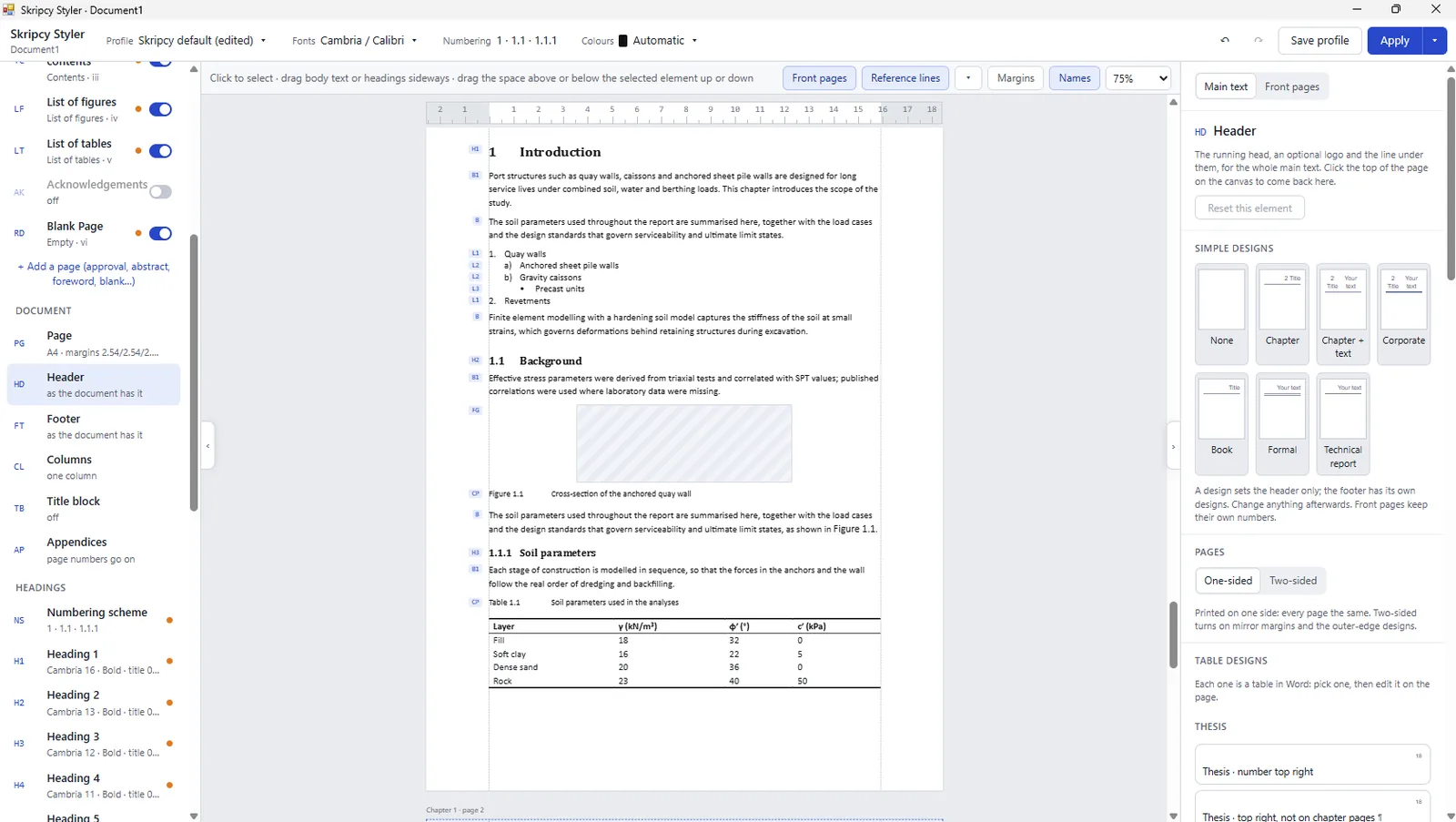
One designer for the whole document.

Set fonts, spacing, margins, headings, numbering and body text on a live page, then Apply to every paragraph of the document at once.

  • Headings 1 to 9 and numbering schemes
  • Body text, first paragraph and lists
  • Profiles you save and reuse
The Skripcy Styler: the page canvas with tags beside each paragraph, the element list and the header designs
Skripcy Styler · Main text

02Front page designer

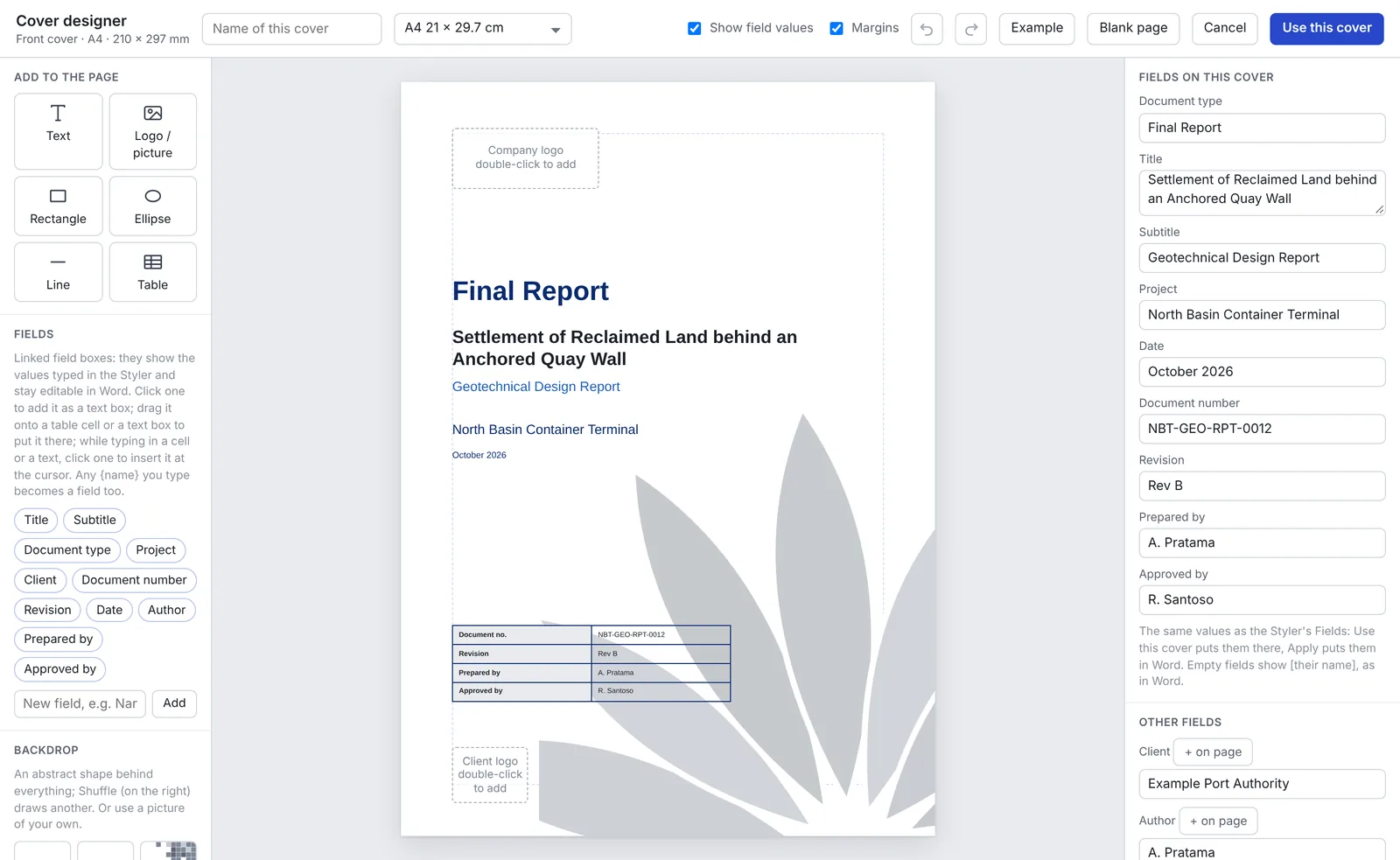
Covers and front pages, designed on the page.

Place text, logos, tables and backdrops freely on the page. Fields such as title, author and document number stay linked, so one change updates every front page.

  • Cover, approval page, abstract, foreword
  • Contents, list of figures, list of tables
  • Covers you save as your own
The Skripcy cover designer with a report cover, its linked fields and the backdrop tools
Skripcy · Cover designer

03Figures, tables and code

Captions and cross-references that keep count.

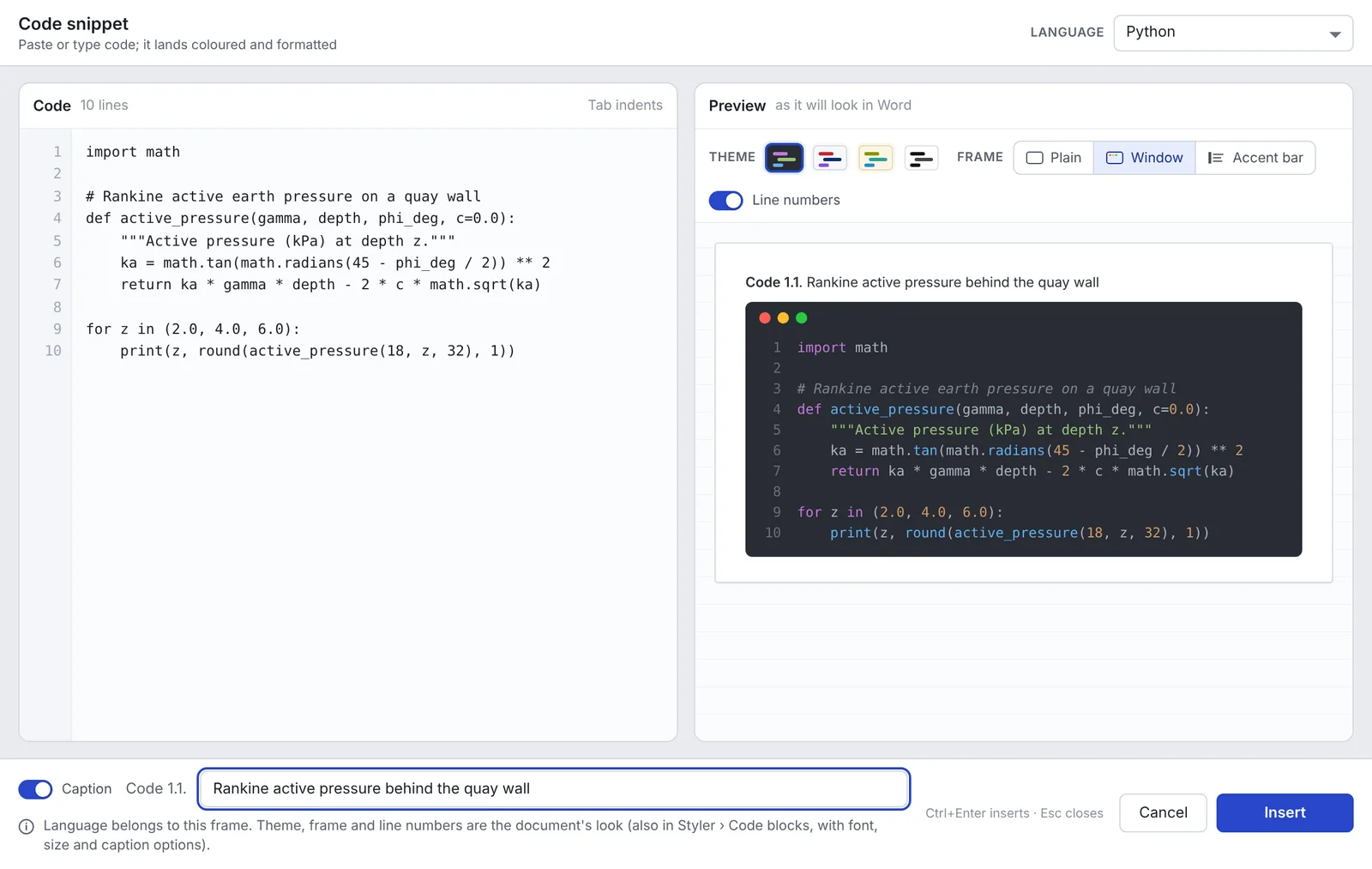
Number figures, tables and code by chapter and refer to them anywhere. Move a chapter and every number and reference follows. Code lands coloured, framed and captioned.

  • Figure 1.1 · Table 2.3 · Code 3.1
  • Cross-references that update with the document
  • Code frames with themes and line numbers
The Skripcy code snippet window: Python code on the left, the coloured, captioned frame as it will look in Word on the right
Skripcy · Code snippet

04Header and footer designer

Running heads drawn as Word prints them.

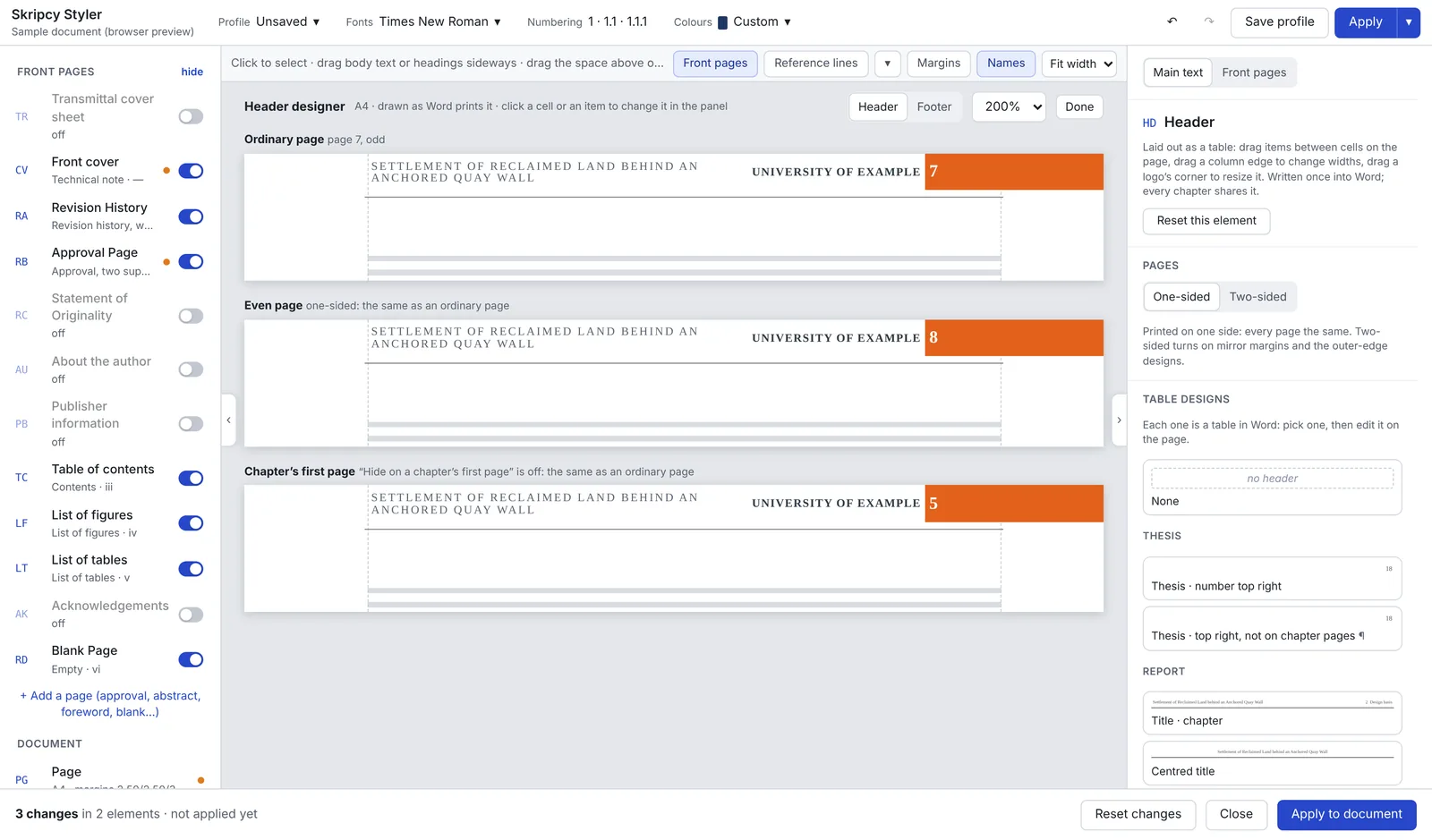
Pick a design or build your own as a table: chapter titles, page numbers, logos and your own text. The designer shows an ordinary page, an even page and a chapter's first page side by side.

  • Thesis, report, book and journal designs
  • One-sided or mirrored for two-sided printing
  • Written once into Word, light on fields
The Skripcy header designer showing one header design on an ordinary page, an even page and a chapter's first page
Skripcy Styler · Header designer

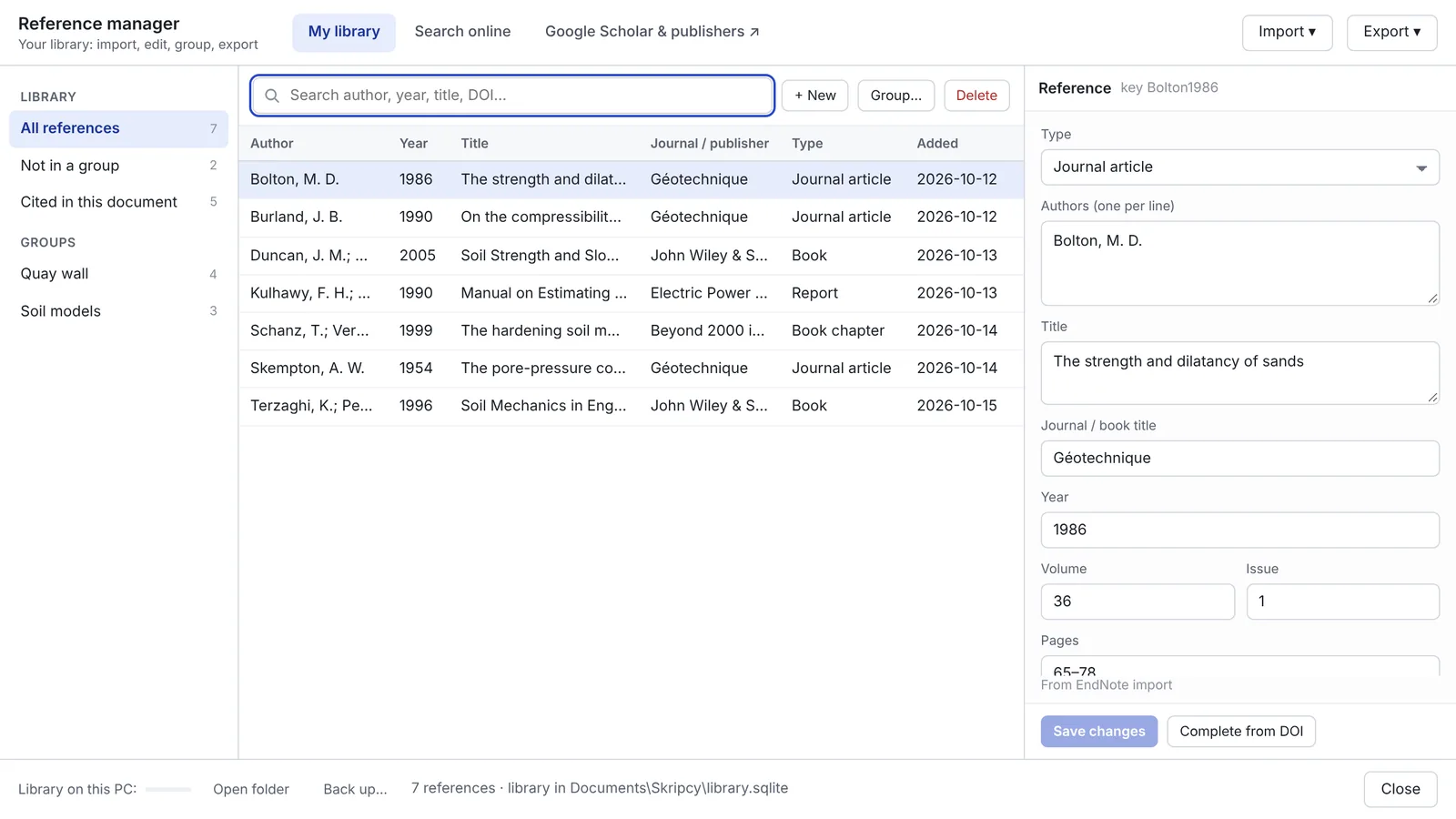
05Reference manager

Your references, inside Word.

Import an EndNote, Zotero or Mendeley library, search Crossref and OpenAlex, and cite while you write. The reference list builds itself in the style you choose.

  • Import EndNote, Zotero, RIS and BibTeX
  • Look up by DOI, title or author
  • Citation styles, numbered or author-year
The Skripcy reference manager: library groups, a list of references and the editor for the selected one
Skripcy · Reference manager
03 — Who it is for03 / 05

Anyone who writes long Word documents.

Students

A skripsi, thesis or dissertation that has to follow a campus guideline.

Lecturers and researchers

Research reports and two-column layouts.

Engineers and professionals

A 200-page technical report, a method statement, a design basis.

Writers and civil servants

Books, manuals, government reports.

04 — Pricing04 / 05

One product, pick a length.

1 month

Rp19.000

one month, 30 days

Bank transfer (virtual account), e-wallet, card, QRIS (coming soon)

Available at launch
3 months

Rp45.000

≈ Rp15.000 a month

Bank transfer (virtual account), e-wallet, card, QRIS (coming soon)

US$5

≈ US$1.67 a month

Card or PayPal, through Lemon Squeezy

Available at launch
6 months

Rp79.000

≈ Rp13.200 a month

Bank transfer (virtual account), e-wallet, card, QRIS (coming soon)

US$8

≈ US$1.33 a month

Card or PayPal, through Lemon Squeezy

Available at launch
Best value 12 months

Rp139.000

≈ Rp11.600 a month

Bank transfer (virtual account), e-wallet, card, QRIS (coming soon)

US$13

≈ US$1.08 a month

Card or PayPal, through Lemon Squeezy

Available at launch

Every pass unlocks every feature; passes differ only in length. Prices in Indonesian rupiah, final, no VAT added (the seller is not a VAT-registered business). Payment is made in advance through DOKU; there is no automatic renewal. Buying again adds the new period to the end of the current one. A 3-day free trial with every feature comes first, once per PC.Every pass unlocks every feature; passes differ only in length. Prices in US dollars for buyers outside Indonesia. Payment is made in advance through Lemon Squeezy, the merchant of record for these sales, which shows any VAT or sales tax your country charges at checkout; there is no automatic renewal. Buying again adds the new period to the end of the current one. A 3-day free trial with every feature comes first, once per PC. Pricing details →

05 — Getting started05 / 05

How it works

From download to a styled document in four steps.

  1. Download

    Get the installer from skripcy.com (Windows).

  2. Install

    A normal Windows account is enough; no administrator rights.

  3. Start your trial

    Enter your email: every feature, free for 3 days.

  4. Style your document

    Open the Styler, choose your look, press Apply.

Your documents

Your documents never leave your PC.

Skripcy works inside Word on your own computer. The text of your thesis, report or book is never sent to our server, unless you yourself attach the document when you send a report with Report a bug: it is then used only to fix that problem and deleted after 60 days. Only your account, your PC id and payments are checked online. Reference look-ups send the search words you type (a DOI or a title) straight to public services such as Crossref.

Skripcy formats; it does not write. It styles the document you wrote yourself and does not replace the guideline that applies to you (your campus, journal, publisher or office).

ComponentSupported
Operating systemWindows 10 (22H2) and Windows 11, 64-bit
Microsoft WordMicrosoft 365, Office 2021, Office 2024; 32-bit and 64-bit Word; Indonesian or English interface
Windows components.NET Framework 4.8; Microsoft Edge WebView2 Runtime (installed automatically if missing)
PermissionsA normal Windows account, no administrator rights
InternetTo sign in and for the reference features; once signed in, Skripcy works offline until your pass ends
Recommended64-bit Word and 16 GB of RAM
Document lengthOn 32-bit Word, Skripcy is comfortable with documents below 300 pages, counted after styling. 32-bit Word has only 4 GB to work in, whatever your PC's memory, so a longer document can make Word close. 64-bit Word has far more room.

Not supported yet: Word 2016/2019, Windows on Arm, Word for Mac, Word in the browser, and shared PCs where many people use one Windows account. Use the 3-day trial to check Skripcy works on your PC.

Questions

Frequently asked questions.

Does Skripcy write or change my content?

No. Skripcy styles and numbers what you wrote: styles, headings, lists, captions, contents and references. It does not write text or change its meaning.

Which Word versions work?

Microsoft 365, Office 2021 and Office 2024 on Windows 10 or 11 (64-bit). 64-bit Word is recommended; on 32-bit Word, keep documents below about 300 pages (File › Account › About Word shows which one you have). Word 2016/2019, Word for Mac and Word in the browser are not supported yet.

Is there a Mac version?

Not yet. Word for Mac needs a different kind of add-in; it is planned after the Windows release.

How do I pay?

Prepaid passes of 1, 3, 6 or 12 months through DOKU: bank transfer (virtual account), e-wallet or card; QRIS (GoPay, OVO, DANA, ShopeePay and bank apps) is coming soon. From outside Indonesia, pay in US dollars through Lemon Squeezy. No automatic renewal.

Is there a reward for inviting friends?

Yes, once your friend pays. Share the invite link from your account page. When a friend who joined through it pays for their first pass, you both get 30 extra days. A sign-up or a trial alone gives nothing.

Does it work offline?

Yes. Skripcy needs the internet to sign in. After that it works until your pass ends, with or without a connection, even if our server cannot be reached. When it is online, it refreshes the licence by itself once a day.

What happens when my pass ends?

Every Skripcy feature button is switched off until you renew. Your documents are not changed or locked; they open and edit in ordinary Word on any PC.

Can I undo what Skripcy does?

Most Skripcy commands undo with one Ctrl+Z in Word, with exceptions. Fast Apply (a choice in Settings) saves the document first, then closes and reopens its file, so Ctrl+Z cannot undo that Apply; instead Skripcy keeps a copy of the file from before the Apply (the last three per document) in Settings › Your data › Backups. Refresh formatting runs as Word's own Ctrl+A, F9, so Word undoes it step by step. Keep a backup of your document all the same.